Streamlining Communication: WhatsApp Business & CRM Integration

The world of business communication is rapidly evolving, and in this digital age, customer expectations are higher than ever. Businesses need to engage with clients where they are most comfortable, and for many, that means on platforms like WhatsApp. With over 2 billion users worldwide, WhatsApp has become an essential tool for businesses looking to streamline their communication strategies. This is where WhatsApp Business shines, providing a suite of tools specifically designed for business-to-consumer interactions.
WhatsApp Business enables companies to connect with customers in a way that feels personal yet professional. The platform offers features such as quick replies, automated greetings, and the ability to categorize chats, which can significantly improve the customer experience. However, to truly harness the power of WhatsApp Business, integrating it with a robust Customer Relationship Management (CRM) system is critical. This integration not only centralizes communication but also enhances data management, ensuring that businesses can provide personalized service at scale.
In this blog post, we will delve into how businesses can streamline communication through WhatsApp Business and CRM integration. We will explore the advantages of using WhatsApp Business, steps to integrate it with your existing CRM, tips for automating responses, and best practices for leveraging these tools in your customer relationship strategies. Finally, we will highlight how Lynxbe, an all-in-one business platform, can be your go-to solution for achieving seamless integration and enhanced customer engagement.
As we navigate through the intricacies of communication strategies, it's essential to recognize that the goal is not merely to engage customers but to foster lasting relationships that drive loyalty and growth. By the end of this post, you will have a comprehensive understanding of how to optimize your communication processes with WhatsApp and CRM, making your business more agile and responsive to customer needs.
Understanding the Benefits of Using WhatsApp Business for Customer Communication
WhatsApp Business offers several advantages that can help businesses enhance their customer communication efforts. First and foremost is accessibility. Customers are already using WhatsApp regularly, making it a convenient platform for them to interact with your business. This familiarity reduces the friction often associated with reaching out to a company through traditional channels like email or phone calls.
Another significant benefit is the ability to send multimedia messages. Unlike text-only channels, WhatsApp allows businesses to send images, videos, and documents, enriching the communication experience. For example, a fashion retailer can send customers images of new arrivals or promotional videos, making their offerings more appealing and engaging.
Moreover, WhatsApp Business provides tools specifically designed for businesses. Features like automated greetings, quick replies, and labels help streamline communication and ensure that customer inquiries are handled promptly. For instance, a customer support team can set up automated responses to frequently asked questions, allowing them to focus on more complex queries and improve overall response times.
How to Effectively Integrate WhatsApp with Your Existing CRM System
Integrating WhatsApp Business with your existing CRM system can seem daunting, but it is a crucial step toward achieving a seamless communication workflow. The first step in this integration process is to choose the right CRM that supports WhatsApp Business. Lynxbe is an exceptional choice in this regard, providing an all-in-one platform that combines CRM, messaging, and marketing functionalities.
Once you have identified the right CRM, the next step is to set up the integration. This typically involves connecting your WhatsApp Business account to your CRM through an API. Most CRM systems, including Lynxbe, offer detailed documentation to guide you through the integration process. This ensures that messages sent and received on WhatsApp are logged in your CRM, allowing for better tracking and management of customer interactions.
After integration, it is essential to define user roles and permissions within your CRM. This ensures that team members can access WhatsApp communications relevant to their responsibilities. For example, sales representatives may need to view messages related to potential leads, while customer service agents may require access to support inquiries.
Tips for Automating Responses and Managing Chats Using WhatsApp
Automation is a powerful tool that can help businesses manage customer interactions more efficiently. By utilizing WhatsApp Business's automated features, companies can ensure that customers receive timely responses, even outside of regular business hours. For instance, you can set up automated greeting messages that are sent to customers when they first reach out, welcoming them and informing them of your business hours.
Another effective automation strategy is to use quick replies for frequently asked questions. These pre-defined responses can save time for both customers and your support team. For example, if you're a travel agency, you could create quick replies for common inquiries about booking procedures, cancellation policies, or travel restrictions.
Furthermore, integrating chatbots with WhatsApp can elevate your customer service capabilities. Chatbots can handle a variety of tasks, from answering questions to guiding customers through complex processes. For businesses with high volumes of inquiries, this can significantly reduce the workload on human agents while ensuring that customers receive immediate assistance.
Best Practices for Utilizing WhatsApp in Customer Relationship Strategies
When incorporating WhatsApp into your customer relationship strategies, several best practices can help ensure success. First, maintain a consistent brand voice across all communications. This helps reinforce your brand identity and ensures that customers have a coherent experience, regardless of the channel they use to communicate.
Additionally, be mindful of response times. Customers expect quick replies, especially on instant messaging platforms. Setting internal benchmarks for response times and monitoring them can help ensure that your team is meeting customer expectations. If automated responses are in place, make sure they are followed up promptly by a human representative when necessary.
It’s also crucial to segment your customer interactions. By categorizing chats based on their purpose—such as sales inquiries, customer support, or feedback—you can tailor your communication approach to fit each situation better. This segmentation can be easily managed through a CRM like Lynxbe, which allows you to tag and organize conversations for efficient follow-up.
Real-World Use Cases from Businesses in the US, UK, and Europe
To illustrate the effectiveness of WhatsApp Business and CRM integration, let’s explore some real-world use cases. In the United States, a popular e-commerce brand utilized WhatsApp Business to enhance its customer support. By integrating their CRM with WhatsApp, they were able to track customer inquiries in real-time, allowing their support team to respond faster. This resulted in a 30% reduction in response time and a significant increase in customer satisfaction ratings.
In the UK, a local restaurant chain adopted WhatsApp Business to manage reservations and customer feedback. By using Lynxbe's CRM features, they could keep track of customer preferences and dietary restrictions, which allowed them to offer personalized service. The integration led to a 40% increase in repeat customers, demonstrating the power of personalized communication.
Across Europe, a travel company integrated WhatsApp Business with its CRM to streamline communication before, during, and after trips. Customers could reach out via WhatsApp for travel updates, inquiries, and feedback. The company reported a 50% reduction in email inquiries, as customers preferred the immediacy of WhatsApp, and they could manage these interactions directly within their CRM.
Step-by-Step: Solving Communication Challenges with Lynxbe Modules
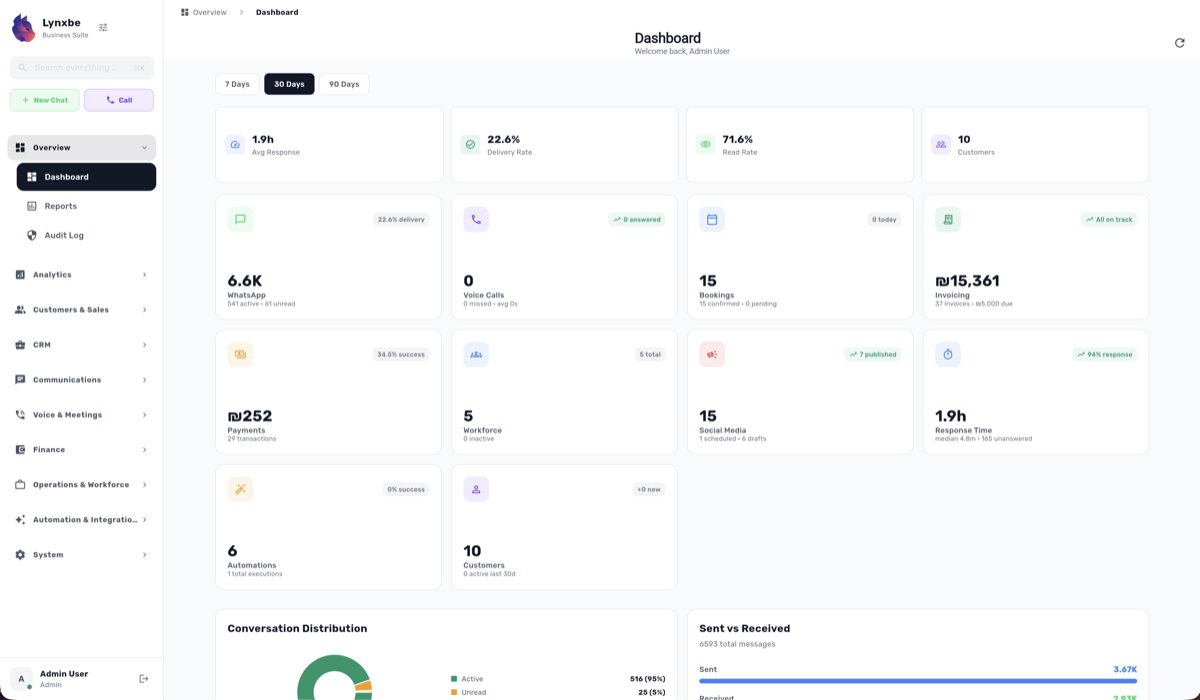
To effectively utilize WhatsApp and CRM integration, Lynxbe provides several modules that work seamlessly together. Start by using the WhatsApp module for full WhatsApp Business messaging capabilities. With features like sending and receiving WhatsApp messages, group management, broadcast capabilities, and automation flows, you can engage customers effectively.
Next, leverage the CRM module to manage your customer relationships efficiently. This module allows you to manage contacts and companies, track sales pipelines and deals, and maintain an activity timeline. Custom fields and tags further enable you to segment customers based on their preferences and behaviors.
Additionally, the Marketing module within Lynxbe allows you to create email campaigns and manage your social media presence. With features such as audience segmentation and campaign analytics, you can measure the effectiveness of your communication strategies and adjust them as needed.
Actionable Insights and Takeaways
In conclusion, integrating WhatsApp Business with a robust CRM like Lynxbe can dramatically enhance your communication strategies. By taking advantage of the accessibility and multimedia capabilities of WhatsApp, businesses can engage customers in ways that feel personal and immediate, fostering loyalty and satisfaction.
Automation plays a vital role in managing customer interactions efficiently. By setting up automated responses and utilizing chatbots, businesses can ensure that inquiries are handled promptly, freeing up human agents to focus on more complex issues. Moreover, adhering to best practices such as maintaining a consistent brand voice and segmenting customer interactions will further enhance the effectiveness of your strategies.
As businesses worldwide adapt to the evolving landscape of customer communication, embracing tools like WhatsApp Business integrated with a comprehensive CRM solution like Lynxbe is no longer optional—it's essential. To explore how Lynxbe can transform your communication strategies, visit our modules at https://www.lynxbe.co.il/en/lynxbe-platform-modules or check out our pricing options at https://www.lynxbe.co.il/en/pricing.




Comments
💬 Share your thoughts