The complete guide to transitioning to the WhatsApp Cloud API platform
In today's digital age, fast and efficient communication between businesses and customers has become critical. With the widespread use of messaging applications, WhatsApp has become one of the most popular platforms for communication. To leverage the potential of WhatsApp, many companies are turning to the WhatsApp Cloud API platform, which offers advanced solutions and numerous options to enhance the customer experience. In this article, we will review everything you need to know about transitioning to the WhatsApp Cloud API platform.
The transition to the WhatsApp Cloud API platform is not simple, but it holds many advantages that can upgrade the communication capabilities of the business. Using this platform allows for easier integration with existing systems, more advanced message management capabilities, and support for new technologies such as artificial intelligence and machine learning. In this guide, we will examine the stages of the transition, the benefits, common troubleshooting, and tips for improving the customer experience.
One of the first questions that arise when starting the transition to the Cloud API platform is: "How do we get started?" There are clear steps in the transition process that need to be followed to ensure everything runs smoothly. Let's start with the transition steps.
Transition Steps from Old Platforms to Cloud API
The first step in transitioning to the WhatsApp Cloud API platform is planning. It is important to understand the business requirements, the needs of the customers, and how to best leverage the platform. A list of all required features should be prepared, such as sending messages, receiving messages, customer management, etc.
Once the preparation is complete, the next step is to register for the WhatsApp Cloud API platform. You need to visit the WhatsApp Business API website and create an account. This process includes verifying the phone number you wish to use and submitting a request for access.
After receiving access, you must begin integration with the existing systems. This is a critical step, as it is essential to ensure that the various interfaces (such as CRM, customer management systems, etc.) work seamlessly with the API. It is advisable to enlist developers or a technical team to ensure the integration is carried out correctly.
Once the integration is completed, you can start conducting tests. This is an important step to ensure everything works properly. All features should be tested, ensuring that messages are sent and received correctly, and resolving potential issues before the service is rolled out to customers.
After completing the tests, the final step is the launch. At this stage, the transition process will be completed, and customers will begin using the new service. It is important to present the new service to customers and provide them with information on how to use it.
Benefits of Using Cloud API
The use of the WhatsApp Cloud API platform offers a variety of benefits that can enhance the customer experience and streamline business operations. One of the most notable advantages is immediate access to information. When using the Cloud API, all information is stored in the cloud, allowing for quick and convenient access from anywhere.
Another advantage is the ability to send messages automatically. With the platform, businesses can send real-time messages to customers, such as updates on orders, reminders for appointments, or special offers. This helps improve customer service and allows the business to stay in touch with its customers continuously.
Additionally, the Cloud API offers advanced analytics systems. Through the platform, businesses can track message performance, check how many messages were sent, how many were opened, and which contents were viewed. This data can assist in improving marketing campaigns and strengthening customer relationships.
As part of the benefits, it is also worth mentioning the ability to send multilingual messages. The Cloud API platform supports many languages, allowing businesses to communicate with customers in different languages and tailor content to the needs of each target audience.
Common Issues in the Transition
Like any technological transition process, there are common issues that may arise. One of the most common problems is issues with verifying the phone number. This is a critical step in the transition, and it must be ensured that the entered number matches the verification required by WhatsApp. If there is a mistake in the number, it should be corrected before proceeding to the integration process.
Another issue may be related to integration with existing systems. It is essential to ensure that developers understand the required processes and know how to work with the API. Often, integration errors can stem from misunderstanding the documentation or from incorrect assumptions.
Issues that may arise during testing include messages not being sent or messages not being received. The code should be checked to ensure everything is functioning correctly. These errors may result from a lack of coordination between the systems or from bugs in the code itself.
Finally, it is important to remember that it is crucial to be prepared to deal with issues that may arise even after the launch. It is advisable to establish a support system that can assist customers if they encounter any problems.
Tips for Improving Customer Experience
Improving customer experience is a central goal for every business, especially when it comes to communication through WhatsApp. One of the first tips is to use simple and clear language. When communicating with customers, it is important that the messages are clear and do not contain technical jargon that may confuse them.
Another tip is to offer real-time support. Customers expect quick responses, so it is important to be available and provide answers to their questions immediately. Automated bots can be used to provide answers to frequently asked questions and ease the burden on the team.
Additionally, it is important to maintain short response times. Customers do not like to wait, so it is essential to ensure that messages are sent and received on time. Tools for analyzing response times can be used to improve team performance accordingly.
It is also important to create engaging and attractive content. Customers enjoy receiving quality content, so it is worth investing in creating marketing messages that offer added value. This content can include tips, information on new products, and special offers.
Practical Examples and Cases from the Israeli Market
Now let's examine some practical examples of transitioning to the WhatsApp Cloud API platform from Israeli technology companies. One of them is "Wolt," which offers delivery services. Wolt used the Cloud API to improve communication with customers. With the help of the platform, they were able to send real-time updates on order status, which increased customer satisfaction.
Another example is "Gett," which offers ride services. They used the Cloud API to send personalized messages to customers, including reminders about available cars, special offers, and support services. This allowed them to enhance the customer experience and provide better service.
The "Shufersal" supermarket chain, the largest in Israel, used the WhatsApp Cloud API to streamline the online ordering process. Customers can send messages to customer service via WhatsApp and receive quick answers to their questions, which increased their trust in the brand.
Finally, the "IKEA" in Israel uses the Cloud API to send customers messages about new promotions, product information, and catalogs. Through the platform, they were able to reach a broader audience and enhance the shopping experience.
Recommendations and Additional Tips
To make the most of the transition to the WhatsApp Cloud API platform, it is advisable to adopt a methodological approach. Regular testing should be conducted to ensure everything is functioning correctly, and usage data should be analyzed to understand customer behavior.
Additionally, it is important to update customers about the changes and provide them with clear information on how to use the new service. This can include guides, videos, or Q&A sessions.
Finally, don't forget to listen to feedback from customers. Open communication with customers can help you better understand their needs and improve your services accordingly.
Insights and Summary
In summary, transitioning to the WhatsApp Cloud API platform
How to do this with Lynxbe
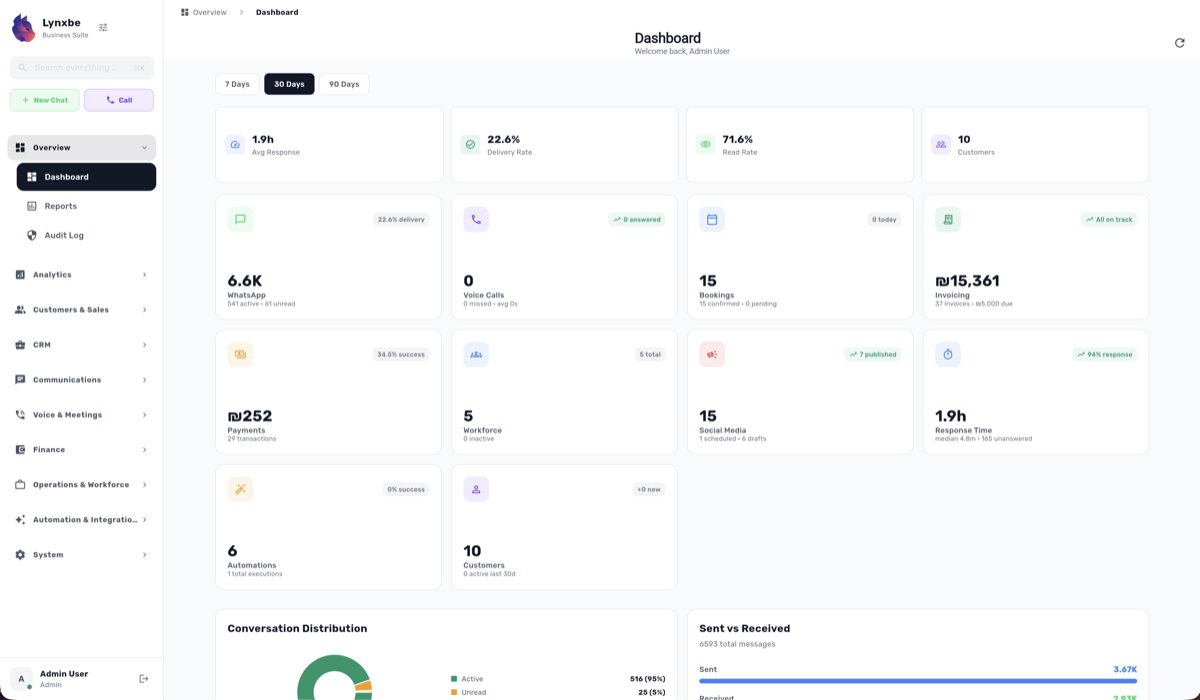
Transitioning to the WhatsApp Cloud API platform can be seamless with Lynxbe, your all-in-one business platform. With Lynxbe, you can integrate WhatsApp messaging, CRM, and marketing tools effortlessly, making it the ideal choice for business owners and managers looking to enhance customer communication and streamline operations.
To start leveraging the power of WhatsApp through Lynxbe, follow these simple steps:
Step-by-Step Guide
1. Set Up WhatsApp: Begin by utilizing Lynxbe's WhatsApp module to send and receive messages, manage groups, and automate responses. You can create chatbot flows and use message templates for efficient communication.
2. Engage with Marketing: Next, enhance your outreach with Lynxbe's marketing module. Create targeted email marketing campaigns, manage your social media presence, and analyze campaign performance to optimize your strategies.
3. Integrate and Automate: Finally, integrate your WhatsApp communications with Lynxbe’s CRM features to track customer interactions and automate follow-ups. This ensures that no message goes unanswered and every lead is nurtured effectively.
With Lynxbe, you can centralize all your business functions, from messaging to marketing, and simplify your operations. Ready to elevate your business? Explore the modules at https://www.lynxbe.co.il/en/lynxbe-platform-modules or check out our plans at https://www.lynxbe.co.il/en/pricing.





Comments
💬 Share your thoughts