
מערכת Team Chat מקצועית
הודעות פנים-ארגוניות עם ערוצים, שרשורים, שיתוף קבצים ואינטגרציות לכל המודולים בפלטפורמה לשיתוף פעולה חלק.
פתרון צ'אט צוותי שלם
מהודעות ישירות ועד ערוצי צוות, הכל לשיתוף פעולה חלק
ערוצים וקבוצות
ארגנו שיחות לפי צוות, פרויקט או נושא. ערוצים ציבוריים ופרטיים עם בקרת גישה מבוססת תפקידים.
שיחות משורשרות
שמרו על דיונים מסודרים עם שרשורי הודעות. הגיבו בהקשר מבלי להעמיס על הפיד הראשי של הערוץ.
שיתוף קבצים
גררו ושחררו קבצים, תמונות ומסמכים ישירות לשיחות. תצוגה מקדימה של קבצים בתוך הצ'אט ללא הורדה.
אינטגרציות פלטפורמה
קבלו התראות מ-CRM, משימות, חשבוניות ומודולים נוספים של לינקסבי ישירות בערוצי הצ'אט.
חיפוש וארכיון
חיפוש טקסט מלא בכל ההודעות והקבצים. ארכיון ערוצים ישנים ואחזור שיחות בעת הצורך.
תיוגים והתראות
תייגו אנשים או צוותים עם @. העדפות התראות הניתנות להתאמה לכל ערוץ עם לוחות זמנים של נא-לא-להפריע.
Chat API
בנו אינטגרציות צ'אט מותאמות אישית דרך API. שליחת הודעות, ניהול ערוצים ויצירת בוטים באופן תכנותי.
צ'אט צוותי בכל מכשיר
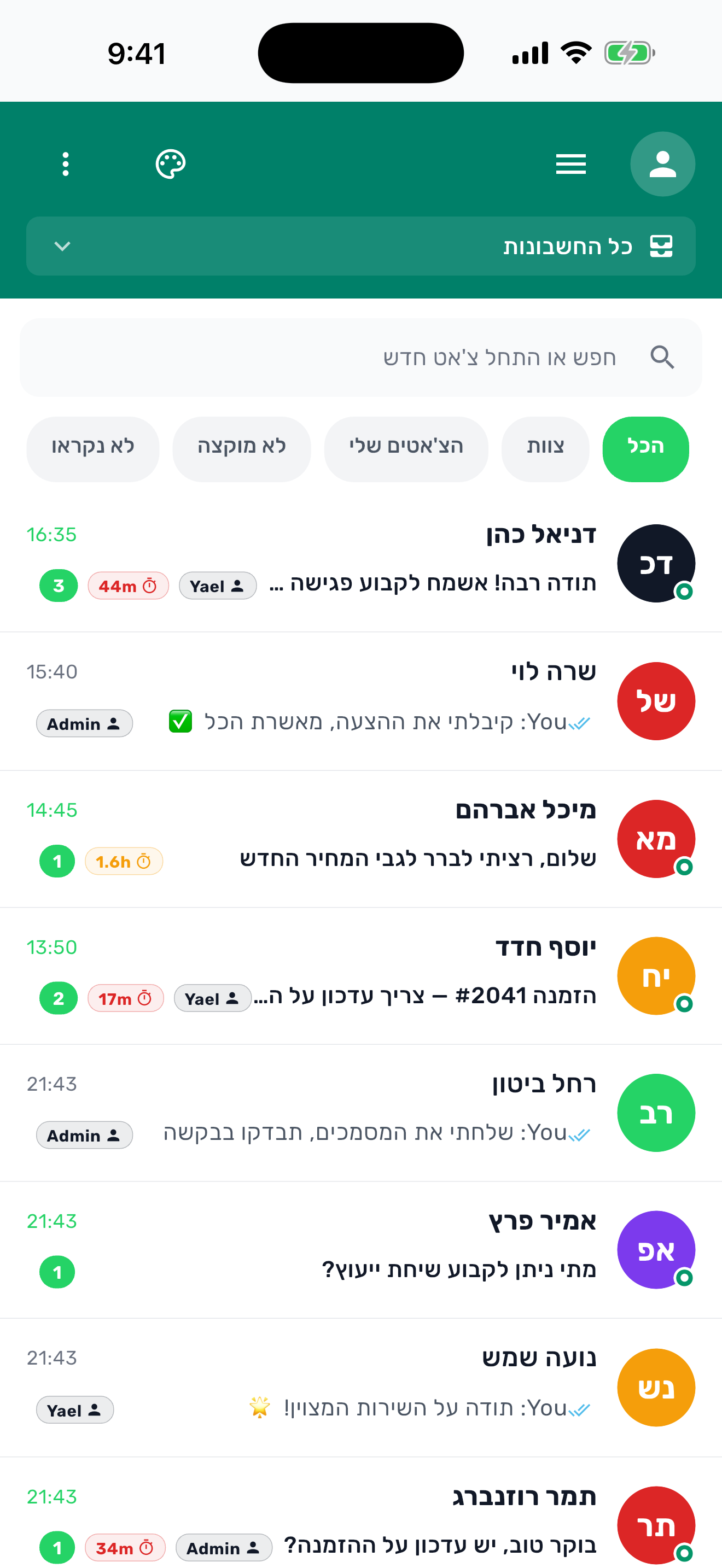
הישארו מחוברים עם הצוות מכל מכשיר
שוחחו מכל מקום
שוחחו במחשב, הגיבו מהנייד ושתפו קבצים מכל דפדפן. התקשורת הצוותית שלכם לעולם לא עוצרת.
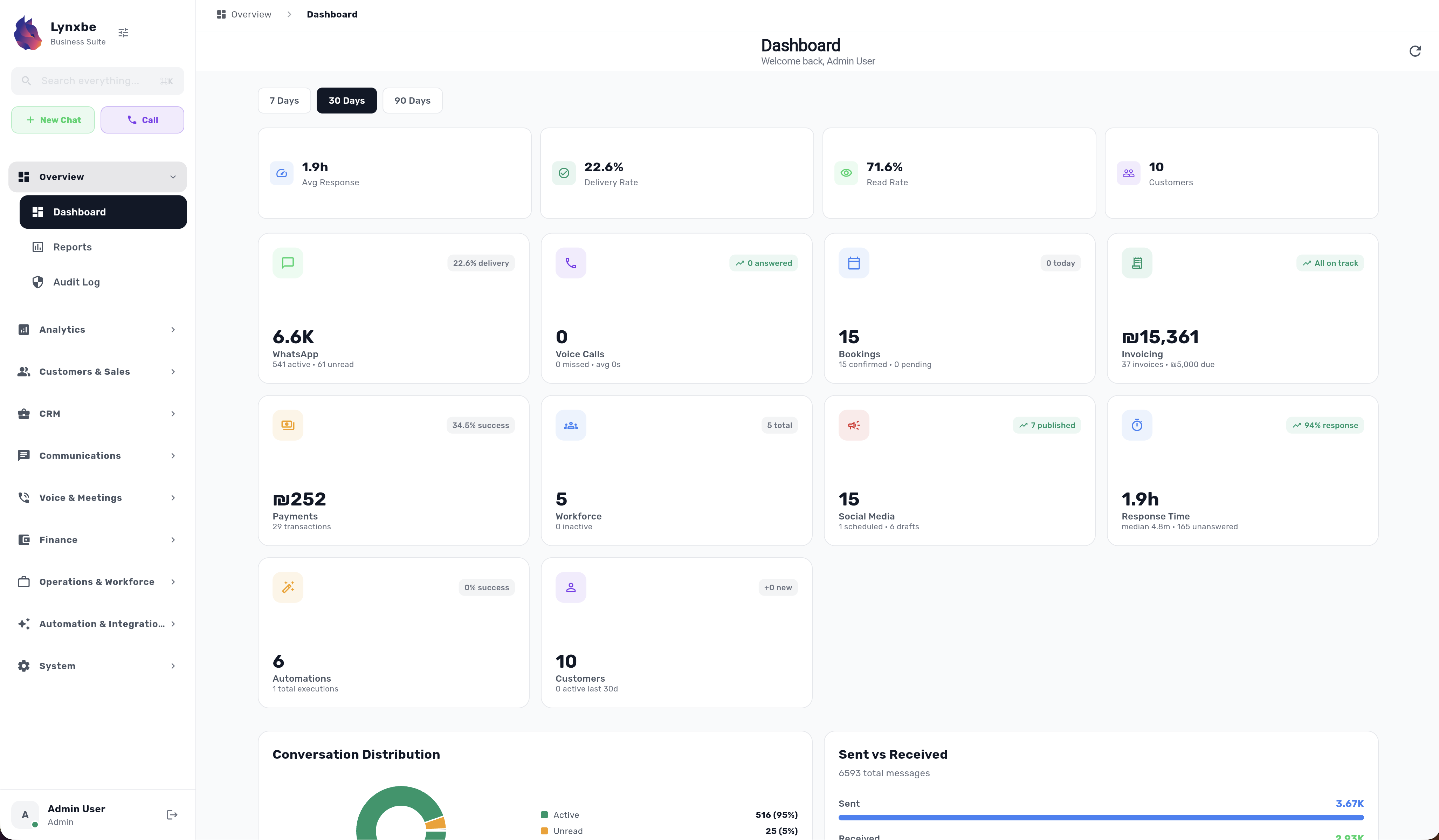
ראו את הפלטפורמה בפעולה
ממשק עוצמתי שתוכנן לפרודוקטיביות על כל מסך
Chat API לפיתוח מותאם אישית
שלבו צ'אט צוותי עם המערכות שלכם דרך API. ניהול ערוצים, היסטוריית הודעות ויצירת בוטים מובנים.
POST /api/v1/email/send
Content-Type: application/json

{
  "to": "customer@example.com",
  "template": "welcome_email",
  "variables": {
    "name": "David",
    "plan": "Business Pro"
  }
}
RESTful API
API מודרני מבוסס REST עם תמיכה מלאה ב-JSON. תיעוד מפורט ודוגמאות קוד לכל endpoint.
Webhooks
קבלו עדכונים בזמן אמת דרך webhooks. הגדירו endpoints מותאמים לכל סוג אירוע.
אבטחה מתקדמת
OAuth 2.0, מפתחות API ו-rate limiting. כל הבקשות מוצפנות ב-HTTPS.
API מכל שפת תכנות
API בפורמט REST ו-JSON שעובד מכל שפת תכנות, עם תיעוד ודוגמאות קוד.
פלטפורמה אחת. הכל מחובר.
כל מודול עובד בצורה חלקה עם השאר. הנתונים שלכם זורמים אוטומטית בין CRM, הזמנות, תשלומים, תקשורת ועוד.
בלי לקפוץ בין אפליקציות
כל מה שצריך במקום אחד. בלי ג'אגלינג בין 10 כלים שונים.
סנכרון נתונים אוטומטי
נתוני לקוחות, הזמנות, תשלומים ותקשורת מסתנכרנים אוטומטית.
אוטומציה חכמה
צרו תהליכים שחוצים מספר מודולים. הזמנה → חשבונית → תזכורת → מעקב.
אנליטיקה מאוחדת
ראו את כל ביצועי העסק בדשבורד אחד עם תובנות חוצות-מודולים.
ראו איך המודולים עובדים יחד
לחצו על כל חיבור כדי לראות איך שני מודולים משתלבים ליצירת אוטומציות חזקות
וואטסאפ + CRM
ראו את כל היסטוריית הלקוח כשהוא שולח הודעה. תייגו אנשי קשר אוטומטית, עקבו אחר שיחות והתאימו תגובות לפי היסטוריית רכישות.
הזמנות + חשבוניות
הפיקו חשבוניות אוטומטית כשהפגישה מסתיימת. שלחו תזכורות תשלום, עקבו אחר הכנסות לפי שירות והתאימו אוטומטית.
תשלומים + הזמנות
גבו מקדמה בעת ההזמנה. מקדמות ותזכורות יכולות לצמצם אי-הגעה. גבו תשלום מלא, הציעו תשלומים ונהלו החזרים.
AI + וואטסאפ
מענה חכם 24/7. ענו על שאלות נפוצות, קבעו פגישות, שלחו הצעות מחיר - הכל אוטומטית בזמן שאתם ישנים.
חוזים + תשלומים
הפעלת גביית תשלום אוטומטית כשחוזה נחתם. ללא רדיפה אחרי לקוחות - כסף עובר בחתימה.
אוטומציות ותהליכים
בנו תהליכים חזקים: ליד חדש → ברכת וואטסאפ → הזמנת הדגמה → שליחת חוזה → גביית תשלום → הוספה ל-CRM.
דוגמה אמיתית: מסע הלקוח המושלם
אפס עבודה ידנית. כל שלב אוטומטי.
שילובים חזקים
ראו איך 3 ו-4 מודולים יוצרים תהליכים עסקיים מלאים
חוויית הזמנה חכמה
הזמנות + וואטסאפ + CRM
לקוח מזמין אונליין → אישור וואטסאפ עם שמו מה-CRM → תזכורת מותאמת עם היסטוריית שירות → מעקב לאחר ביקור לפי העדפות
מחזור חיוב אוטומטי
חשבוניות + תשלומים + אימייל
חשבונית מופקת → קישור תשלום מוטבע → אימייל נשלח → תזכורת ב-7 ימים → אימייל תודה בתשלום → קבלה נשלחת אוטומטית
מתזמן חכם 24/7
AI + וואטסאפ + הזמנות
לקוח שולח הודעה ב-2 בלילה → AI מבין את הכוונה → מציג זמנים פנויים → מזמין תור → מאשר מיד → ללא צורך בנציג
מוקד טלפוני חכם
מרכזיה וסימים + CRM + אנליטיקה
שיחה נכנסת → כרטיס לקוח קופץ עם היסטוריה מלאה → הנציג רואה רכישות קודמות והעדפות → השיחה מתועדת אוטומטית → אנליטיקה עוקבת אחר משך, תוצאות וביצועי נציג
תזכורות רב-ערוציות
SMS + וואטסאפ + הזמנות
לקוח מזמין תור → אישור וואטסאפ נשלח → תזכורת SMS 24 שעות לפני → תזכורת וואטסאפ שעה לפני → לא הגיע? הודעת תיאום מחדש בשני הערוצים
תמיכת AI רב-ערוצית
מרכזיה וסימים + וואטסאפ + AI
לקוח מתקשר → עוזר קולי AI עונה → לא מצליח לפתור? מעביר לוואטסאפ לעזרה מפורטת → AI ממשיך שיחה בצורה חלקה → תמלול מלא נשמר
עסק שירות מלא
CRM + הזמנות + חשבוניות + תשלומים
לקוח חדש נוסף ל-CRM → מזמין שירות → הפגישה הושלמה → חשבונית מופקת אוטומטית עם פרטי הלקוח → תשלום נגבה → היסטוריה מתעדכנת ב-CRM
מעורבות לקוח חכמה
CRM + AI + וואטסאפ + אנליטיקה
AI מזהה לקוחות בעלי ערך גבוה ב-CRM → שולח הצעות מותאמות בוואטסאפ → עוקב אחר מעורבות → אנליטיקה מציגה ROI → AI ממטב את הקמפיין הבא
מכונת סגירת עסקאות
CRM + חוזים + תשלומים + אימייל
ליד מסומן 'מוכן' ב-CRM → חוזה מופק אוטומטית עם הפרטים → נשלח לחתימה אלקטרונית → תשלום מופעל בחתימה → אימייל ברוכים הבאים נשלח → העסקה נסגרה
שאלות נפוצות
כל מה שצריך לדעת על המודול הזה
מה זה Lynxbe Team Chat?
האם אפשר ליצור ערוצים פרטיים?
האם Team Chat תומך בשיתוף קבצים?
האם אפשר לחבר את Team Chat לכלים אחרים?
האם Team Chat זמין בנייד?










הצטרפו לעסקים שמשתמשים בצ'אט צוותי של לִינְקְסְבִּי. התחילו 14 יום חינם בחבילת הכל כלול.
אפליקציית לִינְקְסְבִּי זמינה להורדה